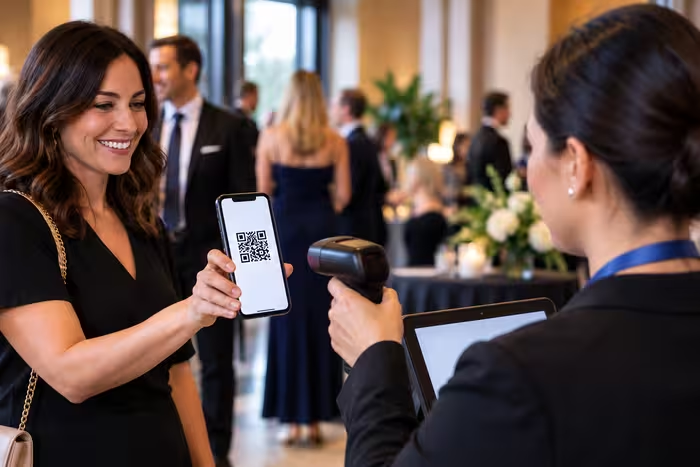
An event ticketing system with QR code check-in helps US nonprofits sell tickets, manage attendee information, verify registrations, and record guest arrivals. Instead of searching through printed guest lists, event volunteers can scan digital tickets to check attendees in and keep attendance records updated.
For charity galas, fundraising dinners, school fundraisers, and community events, connecting ticket sales with event-day check-in can reduce manual administration and make the arrival process easier to manage.
GalaBid offers nonprofit event ticketing with QR code check-in, guest management, individual and table tickets, and fundraising tools that can operate within the same campaign.
What Is an Event Ticketing System With QR Code Check-In?
An event ticketing system is software that allows organizations to create, sell, distribute, and manage tickets for an event. When QR code check-in is included, the system can also identify registered attendees and record their arrival.
Each eligible attendee receives a ticket containing a QR code. When the guest arrives, an authorized volunteer scans the code using a supported device. The system identifies the corresponding registration and allows the volunteer to complete check-in.
For nonprofits, this connects ticket sales, registration information, and attendance records without requiring organizers to maintain separate check-in spreadsheets.
An event ticketing system with QR code functionality may include:
- Online event registration and ticket sales
- Digital tickets with unique QR codes
- Mobile QR code scanning
- Guest and attendee management
- Multiple ticket types
- Manual guest lookup
- Attendance tracking
- Event reporting
The exact features depend on the platform. Nonprofits should confirm which functions are included before choosing a system.
How Does QR Code Event Ticketing Work?
QR code event ticketing connects the ticket purchase process with event-day registration.
When a supporter purchases or receives an event ticket, the system creates a corresponding registration record. The attendee receives a digital ticket containing a QR code that can be presented when arriving at the venue.
An authorized volunteer scans the QR code to identify the registration and complete check-in.
The typical process includes:
- Ticket purchase: A supporter purchases or receives an event ticket and provides the required registration information.
- Digital ticket: The attendee receives a ticket containing a QR code.
- Event arrival: The attendee presents the QR code on a phone or printed ticket.
- QR code scanning: A volunteer scans the code using the event ticketing system.
- Ticket verification: The system identifies the corresponding ticket and registration.
- Check-in: The volunteer records the attendee's arrival.
- Attendance tracking: Organizers can review check-in information as guests enter.
This process can be particularly useful for fundraising events where sponsors purchase multiple tickets or entire tables.
Why US Nonprofits Use QR Code Check-In
Nonprofit fundraising events often involve more than selling admission tickets. Organizers may also need to manage sponsors, invited guests, complimentary tickets, seating arrangements, and fundraising activities.
QR code check-in connects event-day registration with the attendee information collected before the event.
Reduce Manual Registration Work
Traditional event registration often involves printed guest lists and volunteers manually searching for names.
This can become difficult when several guests arrive at once, particularly at larger fundraising galas.
QR code scanning allows volunteers to identify registered attendees electronically. When a guest presents a valid ticket, the volunteer can complete the check-in process without manually searching through the entire attendee list.
Organizers should still prepare an alternative procedure for guests whose tickets are missing or cannot be scanned.
Track Guest Arrivals
Knowing how many tickets have been sold is different from knowing how many guests have arrived.
An event ticketing system with attendance tracking helps organizers monitor event-day arrivals.
This information can help the registration team identify outstanding attendees and manage the arrival process.
For fundraising dinners with assigned seating, accurate attendance records can also help organizers coordinate with the event team.
Manage Different Ticket Types
US nonprofit fundraising events frequently offer different admission options.
A charity gala might sell individual tickets, corporate tables, VIP admission, and complimentary tickets for invited guests.
An integrated ticketing system connects these different ticket types with the corresponding attendee records.
This can make registration easier to manage than maintaining separate check-in lists for each ticket category.
Digital Tickets vs Printed Tickets for Nonprofit Events
Digital tickets allow attendees to access their admission information on their phones without carrying a physical ticket.
Printed tickets remain useful for supporters who prefer paper copies or want an alternative to using a mobile device.
Both formats can support QR code check-in when the ticket includes a readable code.
Digital tickets can reduce the need to print and distribute physical admission tickets. However, guests may occasionally have difficulty locating their tickets or accessing them on their phones.
Printed tickets offer an alternative, although they can also be misplaced or damaged.
For many nonprofit events, allowing attendees to present either a digital or printed ticket provides additional flexibility.
How to Set Up QR Code Check-In for a Nonprofit Event
Preparing your event ticketing system before guests arrive is important. Volunteers should understand the check-in process, and organizers should confirm that registration information is accurate.
Create Your Event and Ticket Types
Begin by setting up your event information and available admission options.
Include the event name, date, venue, ticket prices, and registration details.
Depending on the fundraiser, ticket options might include:
- General admission
- Individual dinner tickets
- Corporate table packages
- Sponsor tickets
- VIP admission
- Complimentary tickets
Keep ticket descriptions clear so supporters understand what each admission option includes.
Review Your Attendee Information
Before event day, review your registration records.
Confirm that individual attendees have been identified, particularly when sponsors or supporters have purchased multiple tickets.
For charity galas, table purchasers may need additional time to assign individual guests to their seats.
Check that attendee names and other required registration details are complete before finalizing your check-in arrangements.
Prepare Your Registration Area
Choose a location where guests can easily find the registration desk when entering the venue.
The number of check-in stations will depend on your expected attendance, available volunteers, and venue layout.
For larger events, consider having a separate area for attendees who need help with missing tickets, registration changes, or other issues.
This allows volunteers to continue checking in guests whose tickets are ready.
Test Your Check-In Devices
Before the event begins, test the devices volunteers will use.
Confirm that authorized volunteers can access the ticketing system and that QR code scanning works correctly.
Check your internet connection and make sure devices are sufficiently charged.
Having backup devices and a manual check-in procedure can help your team handle unexpected technical problems.
Train Your Volunteers
Even a straightforward ticketing system requires some preparation.
Give volunteers an opportunity to practice scanning tickets and searching for attendees before the event.
They should understand how to:
- Access the event check-in system
- Scan an attendee's QR code
- Locate a guest manually
- Confirm the correct registration
- Record an attendee's arrival
- Recognize situations that require administrator assistance
Establishing these procedures before guests arrive can help the registration team work more efficiently.
How GalaBid's QR Code Check-In Works
GalaBid's event ticketing functionality allows eligible organizations to create and sell tickets, manage guests, and check attendees in during an event.
Authorized volunteers can access Event Check-In through a Volunteer Account and use the QR code scanner to identify ticket holders.
The process involves opening the check-in function, scanning the attendee's ticket, and completing the registration check-in.
When an attendee cannot present their QR code, authorized staff can use manual guest lookup instead.
This allows nonprofits to manage both standard check-ins and registration exceptions within the ticketing system.
What Happens if a Guest Doesn't Have Their QR Code?
Not every attendee will arrive with a digital ticket ready to scan.
Some guests may have deleted their confirmation email, forgotten their phone, or experienced difficulty opening their ticket.
Your event team should have a clear procedure for handling these situations without disrupting the entire registration process.
GalaBid supports manual guest lookup, allowing authorized volunteers and campaign administrators to locate attendee records and complete check-in when appropriate.
Before manually checking someone in, volunteers should verify that they've located the correct registration.
If the attendee's details don't match the available records, refer the issue to an event administrator.
How to Handle Duplicate or Invalid Tickets
Occasionally, a QR code may not verify as expected.
This could happen because a guest presents an incorrect ticket, a registration has been transferred, or an attendee has already been checked in.
Event volunteers should avoid making assumptions about the reason for a verification problem.
Instead, establish a procedure for reviewing the corresponding registration record.
If the issue cannot be resolved at the registration desk, direct the attendee to an authorized event administrator.
For transferred tickets, confirm that the current attendee's information matches the updated registration.
Having a clear escalation process helps volunteers handle exceptions consistently.
How to Reduce Long Check-In Lines at Fundraising Events
QR code scanning can reduce manual registration work, but organizers still need an effective arrival process.
A single registration desk may not be sufficient when hundreds of attendees arrive within a short period.
Plan your check-in arrangements around the size of the event and expected arrival patterns.
Practical steps include:
- Ask attendees to prepare their digital or printed tickets before reaching the registration desk.
- Position volunteers near the entrance to direct guests to available check-in stations.
- Use multiple registration stations when attendance and staffing justify them.
- Provide a separate area for missing tickets and registration questions.
- Test scanning devices and connectivity before opening the doors.
- Assign an event administrator to handle unresolved registration issues.
Clear signage and trained volunteers can also help guests find the appropriate registration area.
How to Track Attendance During Your Fundraising Event
Event ticket sales provide information about registrations, but they don't necessarily reflect actual attendance.
An integrated check-in system allows organizers to monitor guest arrivals as the event progresses.
For example, a charity gala organizer may want to know how many registered guests have checked in before the dinner program begins.
GalaBid provides guest and check-in status information through its campaign management tools.
After the event, attendance records can also help organizations review their registration process and plan future fundraising events.
Connecting Event Check-In With Silent Auctions and Donations
For many US nonprofits, ticket sales are only one part of a fundraising event.
A charity gala may also include a silent auction, raffle, donation campaign, or other fundraising activities.
Using separate systems for event ticketing and fundraising can create additional administrative work.
GalaBid allows organizations to manage event ticketing alongside fundraising activities within the same campaign.
This gives organizers a connected approach to managing event admission and fundraising participation.
For example, a supporter attending a charity gala may purchase an event ticket and participate in the event's silent auction.
Using a fundraising platform that supports both activities can reduce the need to maintain completely separate campaign systems.
What to Look for in an Event Ticketing System for US Nonprofits
When choosing event ticketing software, consider how the system will work during the actual event, not just how it handles online ticket purchases.
For nonprofits hosting galas, fundraising dinners, and other ticketed events, useful features may include:
- QR code ticketing: Digital tickets that attendees can present at the venue.
- Mobile check-in: QR code scanning through supported mobile devices.
- Manual guest lookup: An alternative when attendees cannot present their tickets.
- Multiple ticket types: Support for individual tickets, tables, and other admission options.
- Guest management: Tools for collecting and updating attendee information.
- Attendance tracking: Visibility into which registered guests have arrived.
- Volunteer access: Appropriate permissions for staff responsible for registration.
- Fundraising integration: The ability to manage auctions, donations, or other fundraising activities alongside ticketing.
Also review the platform's current pricing, payment-processing arrangements, and available organizer support.
The right event ticketing system should match your event's actual registration and fundraising requirements.
Common Event Check-In Mistakes to Avoid
One common mistake is waiting until event day to test the ticketing system.
Even when organizers have successfully sold tickets, they still need to confirm that scanning devices, volunteer accounts, and registration records are ready.
Another mistake is failing to prepare for guests who arrive without their QR codes.
If volunteers don't know how to locate attendee records manually, a simple missing-ticket issue can delay registration.
Other problems include incomplete guest lists, insufficient check-in stations, unclear volunteer responsibilities, and failing to prepare for ticket transfers.
Reviewing these issues before the event can help your team manage arrivals more effectively.
Frequently Asked Questions
What is an event ticketing system with QR code check-in?
An event ticketing system with QR code check-in allows organizers to sell or distribute event tickets and verify attendees electronically. Guests present a QR code, which authorized staff scan to identify the corresponding registration and record attendance.
Can nonprofits use QR codes for event tickets?
Yes. Nonprofits can use QR code ticketing for fundraising galas, charity dinners, school events, and other ticketed activities when their chosen platform supports the functionality.
Do volunteers need special QR code scanners?
Not necessarily. Some event ticketing systems support QR code scanning through compatible mobile devices. GalaBid provides QR code check-in through its event ticketing tools and authorized Volunteer Accounts.
Can attendees use printed QR code tickets?
Yes. QR codes can be displayed on a phone or printed on paper, provided the code is readable and compatible with the event's scanning system.
What happens if a guest forgets their ticket?
With GalaBid, authorized volunteers or campaign administrators can search for the attendee's registration and complete manual check-in after verifying the correct guest record.
Can organizers track attendance during the event?
Yes. Event ticketing systems with integrated check-in can record guest arrivals. GalaBid provides guest and check-in status information through its campaign management tools.
Can an event ticketing system support silent auctions?
Some fundraising platforms support both event ticketing and silent auctions. GalaBid allows nonprofits to manage ticketing, auctions, donations, and other fundraising activities within the same campaign.
Manage Event Tickets and QR Code Check-In With GalaBid
Make event-day registration easier for your team and supporters with GalaBid's US nonprofit ticketing platform.
Create and sell event tickets, manage attendee information, check guests in using QR codes, and track attendance from one fundraising platform. If your event also includes a silent auction or donation campaign, GalaBid lets you manage those fundraising activities alongside ticketing.
Whether you're organizing a charity gala, benefit dinner, school fundraiser, or community event, GalaBid helps connect ticket sales with event-day registration.
Start your US nonprofit event ticketing campaign with GalaBid today.
More articles about Ticketing & Check-in for Fundraising Events
About GalaBid
Ideal for donations. Perfect for Raffles. Awesome for Live and Silent Auctions! GalaBid’s online fundraising platform is designed for fundraisers of all types and sizes. For over 10 years we’ve been helping non-profits, charities, community clubs, churches, schools, and individuals to raise more and make a difference.