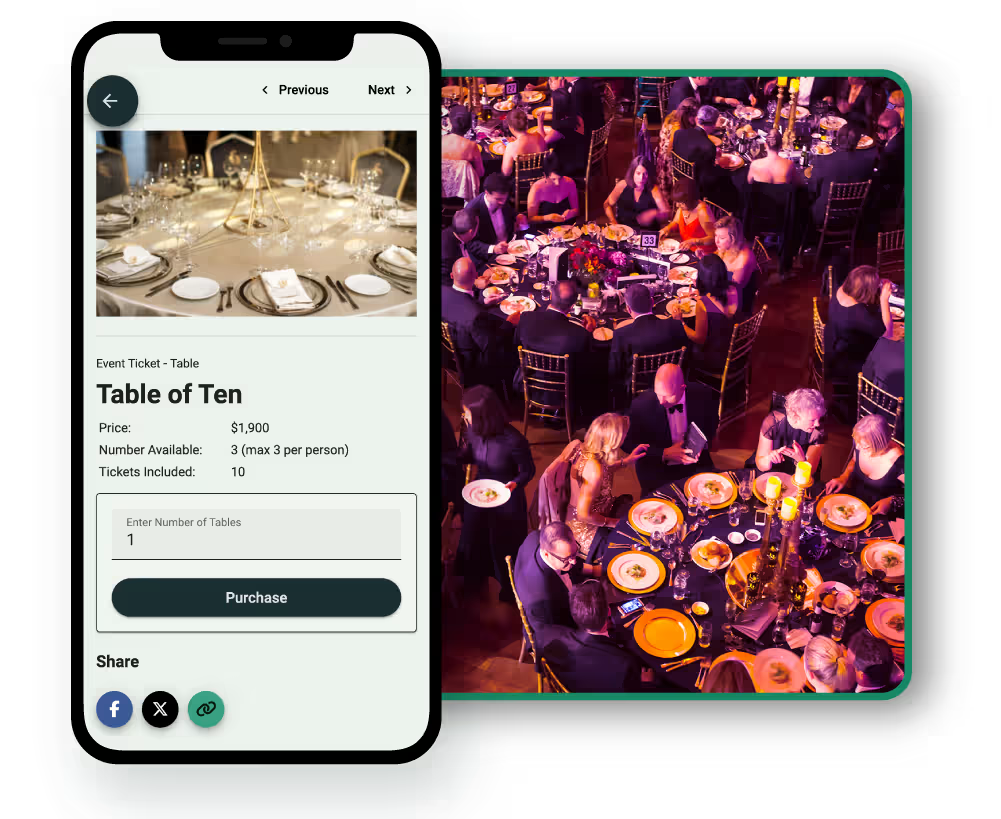
Selling a whole table can simplify ticket sales, but it creates a different guest management challenge.
One person, company or sponsor may buy eight or ten seats in a single transaction without knowing exactly who will use every seat at the time of purchase. Those attendees then need to be assigned, invited and confirmed, and some may need to be replaced before the event.
The first decision is who will manage that process. Some table purchasers are happy to manage their own attendees. Others, particularly corporate sponsors, may simply send the organizer a list of names and expect the event team to handle the administration.
A good system should support both approaches without making the process harder than it needs to be.
This guide focuses specifically on managing the people attached to a whole-table purchase. If you are still deciding whether to sell seats individually or as tables, our guide to individual tickets vs. tables for a charity gala looks at that decision in more detail.
Why Table Guest Management Is Different
When someone buys an individual ticket, the purchaser and attendee are usually the same person. A table purchase is different. One transaction can represent several attendees, and the purchaser may not know every name when they buy.
That means the event team needs to manage both the purchase and the people attached to it. Our guide to event registration vs. ticketing for nonprofits explains this buyer-versus-attendee distinction in more detail.
For a table purchase, there are three separate roles:
How much each person does will vary. The aim is not to force every purchaser through the same process, but to make sure every seat eventually has the information the organizer actually needs.
Decide Who Will Manage the Guest List
Not every table purchaser will want to manage attendees in the same way.
1. Purchaser-Managed Tables
An individual supporter who buys a table may be happy to handle their own group. They can add people as they confirm, send invitations and make changes if someone can no longer attend.
This keeps much of the administration away from the event team while giving the purchaser control over who uses their seats.
2. Organizer-Managed Tables
Corporate and sponsor tables often work differently. A company may buy a sponsorship package that includes a table, then send its final attendee list to the nonprofit later.
The sponsor contact may have no interest in logging into an event platform or managing individual tickets. In that case, the organizer can take the names and handle the assignments and later changes on the company's behalf.
If sponsorship tables form a significant part of your event, our guide to corporate table sponsorships vs. individual tickets looks at how the two models differ.
3. A Mixture of Both
You do not need one rule for the entire event. Some purchasers may manage everything themselves, while others email you their attendee details and ask your team to handle it.
A purchaser who starts by managing their own table may also need the organizer to step in later. The most practical approach is to support both rather than giving every table purchaser another administrative job.
Start With the Table Purchase, Not the Final Guest List
A supporter or sponsor may know they want the table long before they know exactly who will attend. Letting them secure it first removes that obstacle, while attendee details can be added as people confirm.
A simple process might look like this:
- The table is purchased.
- The purchaser is told how attendee details will be managed.
- Seats are assigned as people confirm.
- Attendees receive any invitation or registration information they need.
- Missing details are followed up before the relevant event deadlines.
- Someone who can no longer attend is replaced where appropriate.
- The final list feeds into catering, seating and check-in.
If the bigger challenge is getting people to commit to whole tables in the first place, see our guide to increasing table sales at a charity gala.
Decide What Attendee Information You Actually Need
A table guest list can quickly become more complicated than necessary, so start with the information you genuinely need to run the event.
For many events that might include:
- Full name
- Email address where direct communication is required
- Dietary requirements
- Accessibility or accommodation requirements
- Any other information that directly affects attendance
Avoid collecting information simply because you might use it later. You may not need every attendee's phone number, relationship to the purchaser or other personal details just to manage their place at a fundraising dinner.
Let Attendees Confirm Their Own Details Where It Helps
The person buying the table may know that Jane is attending, but Jane is the better person to confirm her dietary requirements or any accessibility accommodation she needs.
Where the ticketing system supports it, the purchaser can provide the attendee's name and email address. The attendee can then receive their own invitation and supply the information required for their seat. This reduces the number of times important details are passed from one person to another.
For an organizer-managed sponsor table, the process may be different. The company might send you its attendee list and your event team can add those people directly. Both approaches can work as long as there is one current record of who is expected.
Set Deadlines Around Your Event
There is no universal point at which a table guest list needs to be complete. Work backwards from the deadlines that actually matter.
Your caterer may need final meal numbers by a particular date. Your venue may need accessibility arrangements confirmed, while your team may need time to prepare name badges, seating plans or other event materials.
Make those deadlines clear to table purchasers and explain why the information is needed.
Please assign your remaining attendees and provide dietary requirements by [date] so we can confirm final arrangements with the venue.
It is also useful to distinguish between information that genuinely becomes fixed and information that can still change. Your caterer's final headcount may be locked even though the name attached to one of those meals can still be changed.
Make Attendee Changes Easy
Changes are normal when tables are purchased well before an event. Someone may become unavailable, a colleague may replace another colleague or a sponsor may change its attendee list several times.
If the table itself is still valid, replacing one person should normally be treated as a ticket transfer rather than undoing part of the original table purchase.
In GalaBid, a purchaser can transfer an assigned table ticket to another person. The organizer can also make that transfer on the purchaser's behalf.
GalaBid does not process partial refunds within the platform. If you need to refund part of a table purchase, you can issue the partial refund directly through Stripe. The purchaser will receive the refund, but the partial refund will not be recorded in the GalaBid campaign.
If the table or multi-ticket purchase is refunded through GalaBid, the refund applies to the whole purchase and all tickets included in it are canceled.
For a simple attendee replacement, transferring the ticket to the new attendee is usually the better option.
Your wider cancellation terms are a separate decision. Our guide to nonprofit event ticket refund policies covers how to set and communicate those rules.
Handle Empty Seats Separately From Attendee Changes
An unassigned seat is not the same as a canceled seat.
A purchaser may have bought a table of ten but only have eight names confirmed so far. The table is still sold. What is missing is attendee information for two of the seats.
Your system should make it easy to see:
- How many seats were purchased
- How many seats have been assigned
- Who has accepted an invitation
- Who has declined
- Which seats are still unassigned
That gives the organizer a much clearer picture than simply asking whether the table is full.
If the purchaser has paid for the whole table, do not assume that an unused place can simply be allocated to someone else. They may want to keep the group together or still be looking for another attendee. If you want the option to place other people into unused seats, agree that with the purchaser rather than making it a last-minute surprise.
As the event gets closer, you can then follow up with the tables that genuinely have outstanding information instead of emailing every purchaser.
Collect Dietary and Accessibility Information Carefully
Dietary and accessibility requirements matter, but keep your questions focused on what the event team needs to arrange.
For dietary requirements, let the attendee provide the information wherever possible rather than asking the purchaser to interpret someone else's needs.
For accessibility, a straightforward question such as:
Do you have any accessibility or accommodation requirements we should know about for this event?
is usually more useful than asking people for medical information.
Once the information has been collected, make sure it reaches the people who need it. Dietary information may need to go to the caterer, while an accessibility request may need to be coordinated with the venue or event team. Personal information should not be shared more widely than necessary.
Keep Communication With Table Purchasers Simple
Table purchasers do not need a long sequence of emails if nothing requires their attention. A few clear communications tied to actions and deadlines are more useful.
1. After Purchase
Explain what happens next. Tell them whether they can manage attendees themselves, whether your team can do it for them and when you will eventually need the information.
2. Before Your Attendee Information Deadline
Contact purchasers who still have unassigned seats or missing information. Tell them exactly what is outstanding rather than sending every purchaser the same reminder.
3. Before the Event
Confirm that their list is complete and provide practical information such as arrival time, check-in arrangements and table number where appropriate.
4. When Something Changes
Give purchasers a simple way to contact the event team if they would rather have you make the change.
The process should feel like support attached to their table purchase, not another job they have been handed because they are helping the event.
For the wider communication journey after someone buys a ticket, our guide to email marketing after a nonprofit ticket purchase covers the full pre-event sequence. Table purchasers may need a different version of that communication because one purchase can represent several attendees.
Prepare the Final Table List for Event Day
By event day, the original table transaction should have become a usable attendee list.
Your team should be able to see who is expected, where they belong and whether there is any information relevant to event operations or check-in.
That could include:
- Attendee name
- Table assignment
- Check-in status
- Relevant dietary requirement
- Relevant accessibility arrangement
The person checking someone in should not have to know who originally purchased the table just to find their name. Keeping the purchaser linked to the attendees is still useful, though, particularly if someone arrives unexpectedly or there is confusion about which group they belong to.
If you want more detail on managing arrivals, see our guide to streamlining fundraising event ticketing and check-in.
Seating strategy is a separate issue from managing the attendees attached to a table purchase. Our guide to fundraising gala table management covers table placement and seating arrangements in more detail.
How GalaBid Handles Table Guest Management
GalaBid allows organizers to sell a table as a multi-ticket purchase without requiring every attendee to be entered at checkout.
After the purchase, the purchaser can assign individual seats as their list comes together. Each attendee receives an invitation and can accept or decline. If someone declines or does not respond, the purchaser can transfer that ticket to someone else.
Organizers can also manage the process from the campaign dashboard. They can assign attendees on behalf of table purchasers, resend invitations and transfer assigned tickets themselves. This is particularly useful for corporate and sponsor tables where the company contact would rather send over a list than manage individual attendees online.
For sponsorship arrangements where seats are included rather than sold through the public ticket page, organizers can also assign free tickets, including free table or multi-ticket items, to sponsor attendees. GalaBid's help guide explains how free event tickets can be assigned to sponsors' guests.
The dashboard gives the event team a current view of who has accepted, who has declined and which seats remain unassigned. That means organizers can concentrate their follow-up on the tables that still need attention rather than maintaining a separate manual list.
Ticketing questions can also be used to collect information such as meal preferences or dietary requirements. Where a purchaser does not know the answer when assigning a seat, the attendee can complete required questions when they claim their ticket.
For the step-by-step process, see the GalaBid help guide on how table ticket purchasers invite and manage their guests.
You can also explore GalaBid's nonprofit event ticketing and check-in to see how table sales, attendee management and event fundraising work together.
Review the Process After the Event
After the event, look at where the administration actually became difficult.
Did purchasers understand how to assign their attendees? Were many seats still unassigned close to the event? Did corporate sponsors consistently ask your team to manage their lists? Were dietary or accessibility details missing? Did replacements create unnecessary work?
The answers can help you simplify the next event.
You may find that individual table purchasers are comfortable managing their own groups while most corporate sponsors prefer organizer-managed lists. If so, there is little reason to force both through exactly the same process next time.
FAQ
Does the Person Who Buys a Table Need to Know Every Attendee at Checkout?
Not necessarily. If your ticketing setup allows individual seats to be assigned after purchase, the purchaser can secure the table first and add people as they confirm.
What Happens if Someone at a Table Can No Longer Attend?
If the table purchase is still valid, you may simply need to transfer that attendee's ticket to someone else. In GalaBid, the purchaser can make the transfer themselves or the organizer can make it on their behalf.
Can We Refund Just One Seat From a Table Purchase?
GalaBid does not process partial refunds within the platform. If you need to refund part of a table purchase, you can issue the partial refund directly through Stripe. The purchaser will receive the refund, but the partial refund will not be recorded in the GalaBid campaign.
If the table or multi-ticket purchase is refunded through GalaBid, the refund applies to the whole purchase and all tickets included in it are canceled.
For a simple attendee replacement, transferring the ticket is usually the cleaner option.
Should the Table Purchaser Collect Dietary Requirements?
They can, but allowing the attendee to provide important information directly can reduce mistakes. The purchaser may assign the seat with basic details while the attendee confirms their own dietary or accessibility requirements.
What if a Corporate Sponsor Does Not Want to Manage Attendees Online?
The organizer can manage the attendees instead. The sponsor can send its list to the event team, which can assign seats, send invitations and make later changes on its behalf.
What if Some Seats at a Purchased Table Are Never Assigned?
That depends on your event policy and agreement with the purchaser. An unassigned seat does not automatically mean the original table purchase has changed.
If the purchaser has paid for the whole table, check with them before giving unused seats to other attendees.
When Should the Final Table Guest List Be Due?
Work backwards from the deadlines that matter to your event, particularly catering, venue and operational requirements. Avoid setting an arbitrary cutoff if attendee names can continue to change without affecting those arrangements.
A Blended Approach to Managing Table Guests
There is no need to make every table purchaser manage attendees in the same way. Let those who want to manage their own table do it, while giving corporate sponsors and other purchasers the option to leave the administration to your event team.
The best table guest management system is the one that gets the organizer the information they need while asking as little unnecessary administration as possible from the people supporting the event.
See how GalaBid's nonprofit event ticketing and check-in can help you sell tables, manage attendees and keep track of changes, or talk to our team on live chat if you have questions about your event setup.
More articles about Ticketing & Check-in for Fundraising Events
About GalaBid
Ideal for donations. Perfect for Raffles. Awesome for Live and Silent Auctions! GalaBid’s online fundraising platform is designed for fundraisers of all types and sizes. For over 10 years we’ve been helping non-profits, charities, community clubs, churches, schools, and individuals to raise more and make a difference.