Free ticketing software for a nonprofit is rarely free in the way the pricing page implies. Somewhere in the flow there is a transaction fee, an attendee cap, a missing integration, or hours of your time spent copying and pasting between systems.
This guide helps you locate those costs before you commit, so you can compare nonprofit ticketing options on total cost of ownership rather than headline number on a pricing page.
What “Free” Actually Means in Ticketing Software
Every platform funds itself somehow, either by converting a share of users onto paid plans or by taking a cut of the ticket proceeds moving through them. Knowing which model you are looking at tells you where your cost will land.
1. Free Up to an Attendee Cap
Genuinely free until your 25th, 100th, or 500th ticket, then you upgrade or sales stop. The cap is usually set just below the event size that would make the platform worth paying for.
2. Free Software, Paid Transactions
Setup costs nothing and a percentage comes off every ticket instead. This is the most common model, and the one most often called free, because there is invoice to use the software.
3. Free Features, Paid Add-Ons
Selling tickets is free. Custom branding, table management, mobile check-in and reporting sit behind a paywall. The real cost will depend on which of them you need.
4. Free Trial That Expires
A full-featured plan for 14 or 30 days. Nothing wrong with it, but it is a trial, not a tier. If your event is eight weeks out, it expires mid-sale.
5. Free for Basic Events, Paid for Advanced Setup
One ticket type at one price is free. Early-bird pricing, tables of ten, sponsor packages and comp tickets are chargeable. Most galas need at least two of those.
6. Free With an Upsell to Premium Features
Ticketing is free and acts as the front door to paid modules: email marketing, a donor database, auctions. The platform is betting you will buy the next thing once your data lives there.
The Hidden Costs of “Free” Software
Price is one line in a budget. Cost is the whole picture, and for ticketing it breaks into seven parts.
1. Payment Processing Fees
Card processing is never free. Stripe’s published US rate is 2.9% plus 30 cents per successful domestic transaction, so 200 tickets at $50 costs $350 before any platform fee applies. Free platforms commonly add a service fee on top, so read the two figures separately. Our guide to payment processing for US nonprofit ticket sales covers how they fit together.
2. Transaction Volume Limits
Caps do not always warn you in advance. If you might grow past the limit, price that upgrade now and treat it as your real cost.
3. Integration Limitations
Free tiers rarely push attendee data into a CRM or email tool. What replaces the integration is someone exporting a spreadsheet and importing it elsewhere, then repeating it after the late sign-ups. See getting ticket data into your CRM for what a clean handoff looks like.
4. Feature Limitations
No custom branding, no multi-event management, limited payment methods, basic reporting, no API. The question is not whether these are nice to have, but whether their absence costs you money: an unbranded checkout supporters do not trust, or one flat ticket price where tiers would have raised more.
5. Support and Training
Free usually means documentation and a community forum. That is fine in April and a problem at 6pm on event night when check-in will not load. Ask what support exists, in what hours and staffed by whom.
6. Data and Analytics
Some free tiers keep only recent data, restrict exports, or report too shallowly to be useful. If you cannot see which promotion sold which tickets, you cannot price next year’s event better than this year’s.
7. Opportunity Costs
The largest and least measured item: hours spent working around an unfamiliar system, revenue lost to a clunky checkout, and follow-up that never happens because the data was too messy to use.
The 2024 Nonprofit Digital Investments Report from NTEN and Heller Consulting found 54% of nonprofits lack sufficient time for new technology, and that available budget is the leading barrier to investment, cited by 77%. Time and money compete here rather than trading off cleanly.
Free Software: When It Actually Works
Free is the right answer more often than vendors admit. Candid’s analysis found nearly 60% of US nonprofits operate on annual budgets below $50,000. For an organization that size running one modest event a year, a subscription can cost more than the event nets in improvement.
Is free software right for you?
- Fewer than 100 attendees, comfortably inside the tier cap
- One event a year, or two at most
- A single ticket price, with no tiers, tables or sponsor packages
- No CRM or email integration needed
- A team can work around software gaps
- Your software budget is genuinely zero rather than merely tight
- You are content to handle follow-up manually
Tick most of these and free is not a compromise. It is the correct call.
Paid Software: When ROI Justifies the Cost
Paid software earns its place when the cost is fixed and the benefit scales. A subscription that looks expensive against one 80-person event looks cheap against four 300-person ones, because the fee does not move while the savings repeat.
Volume, frequency and integration are the clearest signals. Events above roughly 200 attendees generate enough fee value for a reduced or bundled rate to matter, tiered pricing lifts your average ticket, and integrated CRM and email replace tools you were paying for separately.
A four-step ROI framework:
- Total your current true cost: software, processing, platform fees, separate email or CRM tools, and staff hours at a loaded hourly rate.
- Total the paid option the same way, with the subscription, the reduced fee rate and a realistic lower staff-hours figure.
- Add the revenue difference conservatively. Model a small percentage lift, not an optimistic one.
- Divide the annual gain by the annual subscription. Comfortably above 1 is worth doing; near 1 means stay put another season.
Cost-Benefit Analysis: Free vs Paid
Here is the comparison for one event selling 200 tickets at $50 for $10,000 of revenue. Staff time is costed at $35 an hour, which is conservative: the Bureau of Labor Statistics puts total employer cost at $47.46 per hour worked for nonunion health care and social assistance workers as of March 2026.
Numbers are illustrative, but the shape is the point. For one event the gap is roughly $295, thin enough that either answer is defensible. Run four events of that size and the subscription stays at $1,200 while every other saving repeats: free comes to about $6,700, paid to about $3,720. Frequency, not size, usually decides this.
Feature Comparison: Free vs Entry-Level Paid
What you give up in a free tier varies by vendor, so treat this as the list to check rather than a rule.
Our roundup of the top event ticketing platforms for fundraisers compares named platforms side by side.
When to Upgrade From Free to Paid
Most organizations do not decide to upgrade. They notice, usually late, that they already should have. Watch for these triggers:
- Sales are approaching the free tier’s attendee cap
- You are running more than two events a year
- CRM integration has moved from useful to necessary
- Manual workarounds cost more than ten hours an event
- Attendees are commenting on checkout or check-in
- Fees are consuming 5% or more of ticket revenue
- You need year-on-year data to price and plan
Move between events rather than mid-sale, and export your attendee list first. Our guide to Eventbrite alternatives for fundraisers covers the timing.
Software Evaluation Checklist: Free vs Paid
Answer these for free and for two or three paid options, then compare totals rather than headline prices:
- How many attendees do we expect, and does the free tier support that?
- How often will we use it, and what is the annual cost across those events?
- Which integrations do we need, and which tier includes them?
- How confident is our team, and who covers it if that person leaves?
- What is the full fee picture, processing and platform separately, as a share of revenue?
- Is CRM integration a requirement or a preference?
- What is an hour of staff time worth, and how many hours does each option consume?
- Are we likely to outgrow the free tier within two years?
- What are we paying for email marketing, and would a paid plan absorb it?
Ticket price feeds straight into the fee calculation, so read our guide to pricing nonprofit event tickets alongside this one.
A Real Example
Dudes for Dads: Paid, Because the Fee Was the Whole Budget
Dudes for Dads supports children who have lost or grown up without a father, with programs across Washington DC, New York, Miami and Ann Arbor. Its annual New York gala draws “about, you know, 400 to 500 people each year,” says volunteer organizer Christian Cleaveland.
Ticketing ran through Eventbrite, because the team started selling before they knew their auction platform also did ticketing. Christian’s account of that checkout is the clearest description of a percentage fee we have heard from a customer: “you click the ticket, it’s like, oh, this ticket’s $200, and then you check out, and it’s like, oh, this ticket’s actually $200, or $222.50.”
His objection was donor trust rather than arithmetic: “we don’t want to put the onus on the people that are, you know, donating the money.” So for the auction and raffle they chose a flat fee over a percentage.
He sets that cost against the whole operating position: “we don’t have any full-time paid employees. It’s, like, 100% sweat equity volunteer hours. So paying 1200 bucks or whatever out of an annual fundraise of, you know, $300,000 is, like, that’s literally our expense for the year.”
How GalaBid Fits
GalaBid gives US organizations three ways to pay rather than one: free with suggested supporter tips, a percentage per transaction with tips turned off, or a flat fee for the campaign. Options differ by country, so check pricing for your region.
That choice is the point. No single fee structure is cheapest for everyone, and a small annual event and a large gala are not the same calculation. Being able to select the model that matches your size does more for your net proceeds than shaving a fraction off a rate.
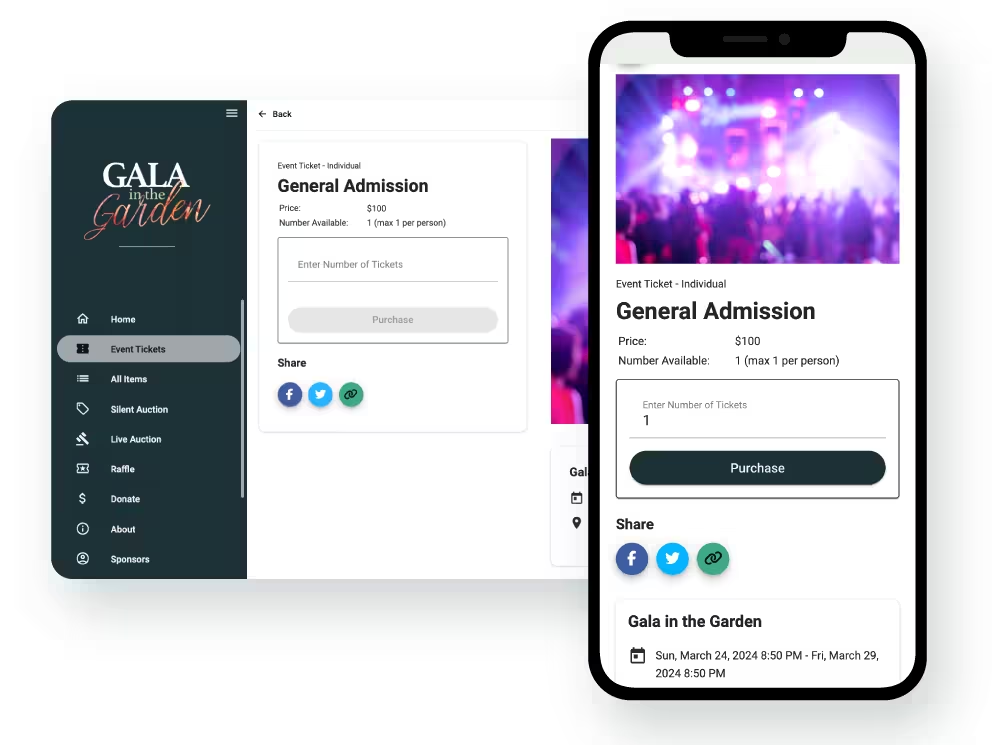
The other half of the cost picture is what sits behind the plan. Ticketing is part of the platform rather than a paid module, and so are the auction, raffle and paddle raise tools. There is no premium tier to unlock when you need table sales or mobile check-in, which removes most of the "free core, paid add-ons" problem described above.
Support works the same way. It is included on every plan rather than sold as an upgrade, which matters more than it sounds like it should. The 6pm-on-event-night scenario earlier in this article is the one that costs organizations real money, and that is not a good moment to find out whether help is chargeable.
Funds never pass through GalaBid either. The payment goes from your supporter's card into your own account with no holding account in between, so your choice of platform does not add a step between the ticket sale and your balance. See our guide to secure payments using GalaBid.
Questions to Ask Free Software Providers
- Is there a hard attendee limit, and what happens the moment we reach it?
- What are all the fees, processing and platform, stated separately?
- If we exceed the free tier, what does the upgrade cost and can we do it mid-event?
- Is the free tier permanent or a trial, and what notice would we get if it changed?
- Can we export our full attendee and transaction data, at any time?
- What support is included, in what hours, and is there an uptime commitment?
- How long has the company been operating?
- What compliance certifications do you hold for payment and data handling?
Common Myths About Free Software
“Free means we save money.” Sometimes. You may save the subscription but pay elsewhere, so it turns on your volume and how much manual work you absorb.
“Free is good enough for small nonprofits.” It is good enough for small, simple, infrequent events. Plenty of small organizations run complicated ones, and a small budget is not always a simple event.
“Paid is always worth it.” Not if you never use the features. A subscription purchased for integrations nobody configures is pure cost.
“Transaction fees don’t matter.” At 3% on $40,000 a year that is $1,200, which is a subscription.
“We can outgrow free later.” You can, but moving mid-growth costs staff time and risks your list. Choosing for where you will be in two years may be cheaper than choosing twice.
FAQ
Is there any truly free ticketing software?
Yes, with conditions. Some platforms charge nothing for the software and cover costs through optional supporter contributions at checkout instead of a mandatory fee. Card processing still applies, because the processor charges that, not the platform.
When should we pay for ticketing software?
When the annual cost divides across enough events, attendees and saved hours to come out below your current true total.
What’s the typical cost of paid software?
Entry-level plans generally sit in the low hundreds of dollars a month, with flat-fee and percentage options alongside subscriptions. Compare annual totals, not monthly rates.
Do transaction fees disappear with paid software?
Card processing does not, and no platform can remove it. Platform fees are often reduced or bundled into the subscription, which is where the saving comes from.
Can we switch from free to paid later?
Yes, and it is common. Move between events rather than during a selling window, and export your data first.
What happens if the free tier is discontinued?
You upgrade, migrate or lose the tool, on the vendor’s timetable. That is a reason to check track record and data portability, not to avoid free.
Is free software safe for attendee data?
It varies widely. Check who holds the funds, whether money passes through the platform or straight into your own account, and what certifications the vendor holds.
Work Out Your Own Number
Free versus paid depends on your attendee numbers, your event frequency and what your team’s time is worth, and only you know those. If you would rather talk the arithmetic through with someone who has seen it a few thousand times, our team will run it with you, and current pricing for your region is on the pricing page.
More articles about Ticketing & Check-in for Fundraising Events
About GalaBid
Ideal for donations. Perfect for Raffles. Awesome for Live and Silent Auctions! GalaBid’s online fundraising platform is designed for fundraisers of all types and sizes. For over 10 years we’ve been helping non-profits, charities, community clubs, churches, schools, and individuals to raise more and make a difference.