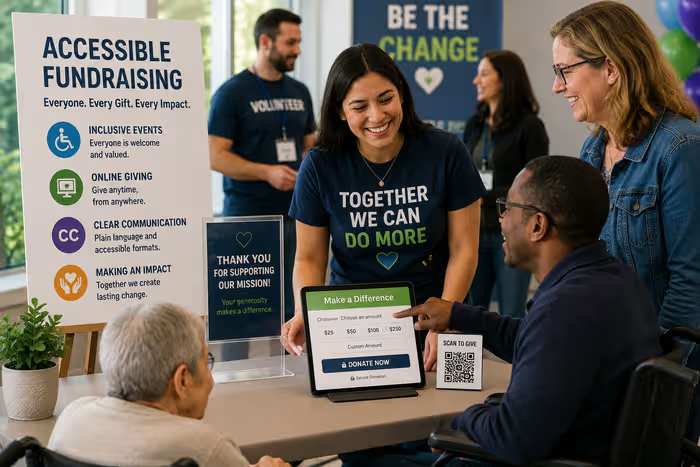
Accessible fundraising helps more people participate while creating a better experience for everyone. Many nonprofits unintentionally create barriers that prevent supporters with different abilities from participating in their raffles. The good news: small improvements in communication, ticketing, and event planning can remove these barriers without significantly increasing costs.
Making your charity raffle accessible means considering the needs of supporters with mobility challenges, visual or hearing impairments, cognitive differences, and varying comfort levels with technology. These improvements benefit all participants—not just those with disabilities. Clear instructions, mobile-friendly ticketing, and flexible participation options make raffles better for everyone.
This guide focuses on practical accessibility improvements that create more welcoming, inclusive raffle experiences for all supporters.
Why Accessibility Matters for Charity Raffles
Understanding why accessibility matters helps prioritize these improvements.
Welcomes More Supporters
Accessible raffles remove participation barriers, welcoming supporters who might otherwise sit out. People with disabilities, older adults, and those with various needs become active participants rather than excluded observers. Removing barriers expands your potential participant base significantly.
Creates Inclusive Community Events
Accessible raffles strengthen your nonprofit's community connection. When everyone can participate comfortably, you build stronger bonds with supporters and model inclusive values. Community members notice when your organization welcomes everyone authentically.
Improves Participant Experience
Accessibility improvements benefit all participants. Mobile-friendly registration works better on everyone's phone. Clear instructions reduce confusion for all supporters. Multiple participation options serve everyone's preferences better. Improving accessibility actually improves the overall experience.
Supports Nonprofit Values
Most nonprofits work toward social good and equity. Accessible fundraising aligns with these values in practice, not just mission statements. Demonstrating commitment to inclusion strengthens your organization's credibility and authenticity.
Makes Fundraising More Effective
More accessible events generate higher participation, stronger engagement, and better results. Removing barriers literally multiplies your fundraising potential. Accessibility isn't a cost—it's an investment in effectiveness.
Make Registration and Ticket Sales Easy
Simple, accessible registration and ticketing drives higher participation.
Mobile-Friendly Ticket Purchasing
Most ticket purchases happen on mobile devices today. Ensure your ticketing system:
- Works smoothly on phones and tablets
- Has large, easy-to-tap buttons
- Displays clearly at small screen sizes
- Loads quickly on slower connections
- Provides clear confirmation immediately after purchase
Test your registration on multiple devices before launch. Ask volunteers to try purchasing on their phones and report any difficulties.
Offer Multiple Ticket Purchase Methods
Different supporters prefer different approaches:
- Online self-service ticket purchase (fastest and most accessible for many)
- Phone ordering for those who prefer talking to staff
- In-person ticket purchase at accessible locations
- Email/mail-in options for those without digital access
- Accessible point-of-sale systems at event
Multiple methods ensure everyone finds an approach that works for them.
Use QR Codes for Easy Access
QR codes on promotional materials, posters, and at event locations link directly to online ticket purchasing. This removes the need to type long URLs, making ticket buying significantly easier. Reference the QR codes for charity raffles guide for implementation details and best practices.
Provide Clear Instructions
Unclear instructions create frustration and lost sales. Provide:
- Step-by-step instructions in plain language
- Visual guides showing the process
- Multiple formats (written, video, audio)
- Contact information for support questions
- Estimated time to complete registration
Simple, clear communication removes confusion and improves participation.
Accept Multiple Payment Methods
Different supporters use different payment approaches:
- Credit and debit cards
- Digital wallets (Apple Pay, Google Pay, PayPal)
- Cash (at in-person locations)
- Bank transfers for bulk purchases
- Installment payment options if possible
Accommodating various payment methods removes financial barriers.
Provide Easy Confirmation
After purchase, supporters should immediately receive:
- Confirmation on screen
- Confirmation email with ticket details
- Mobile ticket (QR code or reference number)
- Clear instructions for raffle drawing participation
- Support contact information
Clear confirmation reduces participant anxiety and increases confidence in your raffle.
Choose an Accessible Venue
If your raffle includes in-person elements, venue accessibility is essential.
Ensure Step-Free Entrances
Level entrances or ramps without steps allow wheelchairs, walkers, strollers, and carts to enter easily. Check that:
- Entrance is step-free
- Ramps (if present) have handrails
- Doors open wide enough for wheelchairs
- Entrance is clearly marked and easy to find
- Parking is near entrance
Test the entrance yourself with various mobility aids to ensure it truly works.
Provide Accessible Parking
Designated accessible parking spaces should be:
- Close to building entrance
- Clearly marked with wheelchair symbol
- On level ground
- Reserved for people with mobility disabilities
- Clearly communicated in advance materials
Offer Appropriate Seating Options
Provide diverse seating to accommodate different comfort levels:
- Regular chairs for standard seating
- Armchairs or supportive seating
- Standing room with support railings
- Wheelchair spaces (no seat required, accessible from aisle)
- Elevated seating for people who need elevation
- Quiet spaces for people overwhelmed by crowds
Improve Digital Accessibility
If you have online raffles or digital materials, ensure they work for everyone.
Use Readable Fonts
Font choices dramatically impact readability:
- Use sans-serif fonts (Arial, Verdana, Calibri) for screens
- Avoid decorative or script fonts that are hard to read
- Use 14pt minimum for mobile, 16pt+ for web
- Provide option to increase text size
- Ensure sufficient line spacing
Good fonts benefit everyone—people with visual impairments, older adults, and those with cognitive differences all appreciate readable text.
Maintain Good Color Contrast
Color contrast affects readability significantly:
- Dark text on light background (or vice versa)
- Avoid color combinations that don't contrast (light gray on white, for example)
- Use contrast checker tools to verify adequacy
- Don't rely on color alone to convey information
- Test in black and white to ensure readability
Good contrast helps people with low vision, color blindness, and those viewing on poor-quality screens.
Add Alt Text to Images
Alt text describes images for people using screen readers and those with slow connections. Effective alt text:
- Briefly describes what the image shows
- Includes relevant information
- Avoids saying "image of" or "picture showing"
- Is specific and meaningful
- Is typically 125 characters or less
Example: Instead of "raffle poster," use "Raffle poster showing two donors handing tickets to smiling raffle winner."
Ensure Simple Navigation
Complex navigation confuses and frustrates users:
- Clear menu structure
- Logical information organization
- Consistent navigation placement
- Search function for easy content discovery
- Skip links to main content
- Breadcrumb navigation showing where you are
Simple navigation helps everyone find information quickly.
Support Screen Reader Compatibility
Screen readers convert digital content to audio or braille for people with visual impairments. Ensure:
- Headings properly formatted (H1, H2, etc.)
- Form labels clearly associated with input fields
- Links have descriptive text (not "click here")
- Tables have headers and proper structure
- Videos have captions and transcripts
Proper formatting makes content accessible to screen readers while improving organization for everyone.
Caption All Videos
Captions benefit people who are deaf or hard of hearing, as well as those watching in noisy environments or without audio available. Captions should:
- Include all spoken dialogue
- Describe important background sounds
- Include speaker identification
- Be synchronized with video
- Use clear, easy-to-read formatting
Use Clear Communication
Straightforward, accessible communication removes confusion and welcomes all supporters.
Write in Plain Language
Plain language is clear and direct:
- Use simple words
- Write short sentences and paragraphs
- Use active voice ("We are holding the drawing at 2pm" not "The drawing will be held at 2pm")
- Avoid jargon and technical terms
- Put important information first
Plain language helps everyone—people with cognitive differences, non-native English speakers, busy readers, and those with limited digital literacy all benefit.
Provide Short, Clear Instructions
Long, complex instructions overwhelm supporters. Instead:
- Break into small, numbered steps
- Use one idea per sentence
- Provide visual examples
- Include common questions and answers
- Offer multiple formats (written, audio, video)
Use Large Text Where Appropriate
Printed materials should use:
- 18pt minimum for most text
- 22pt+ for large print versions
- Bold for emphasis (not ALL CAPS)
- Clear, sans-serif fonts
- Significant white space
Use Multiple Communication Channels
Supporters have different communication preferences:
- Email for detailed information
- Text messages for urgent updates
- Phone calls for complex questions
- In-person conversation for personal connection
- Large print and audio formats
- Website and social media for ongoing updates
Offering multiple channels ensures everyone receives information in their preferred format.
For accessible email communication throughout your raffle campaign, reference the email marketing sequences guide for template ideas and best practices.
Combine Visual and Written Information
Different supporters process information differently:
- Include both images and text descriptions
- Use diagrams and flowcharts for complex processes
- Provide videos with captions
- Offer written summaries of visual content
- Use icons with text labels
Combined formats help everyone understand better. To extend your reach, explore social media promotion strategies for creating accessible content across all platforms.
Provide Event Information in Advance
Supporters with disabilities often need to plan differently:
- Share venue information weeks ahead
- Include accessibility details (parking, entrance, restrooms)
- Describe the raffle process clearly
- List any sensory elements (loud music, bright lights)
- Offer options for accommodations
- Provide contact information for questions
Advance information allows supporters to prepare and participate comfortably.
Make Participation Flexible
Flexible participation options remove barriers and increase engagement.
Offer Online Participation
Digital participation allows people who can't attend in person to participate:
- Online ticket purchasing
- Virtual raffle drawings
- Remote participation options
- Digital ticket delivery
- Video winner announcements
For comprehensive guidance, explore the online raffle platform that makes remote participation easy and engaging.
Provide Hybrid Raffle Options
Hybrid raffles combine in-person and online participation:
- In-person ticket sales and events
- Online ticket purchasing
- Simultaneous drawing (in-person and digital audience)
- Video streaming of event
- Multiple ways to participate
Hybrid options maximize inclusion and reach. Reference the hybrid raffle guide for detailed implementation.
Enable Remote Winner Announcements
Winners shouldn't need to be present to claim prizes:
- Phone notification of winners
- Video call winner announcements
- Mail delivery of prizes
- Digital prize fulfillment information
- Flexible prize collection times
Common Accessibility Mistakes
Learning from common mistakes helps improve your raffle.
Complicated Registration
Mistake: Requiring excessive information or multiple steps.
Solution: Collect only essential information. Limit registration to 3-4 key steps. Offer phone or in-person support for questions.
Small Text
Mistake: Using 10-12pt fonts or decorative fonts.
Solution: Use 14pt minimum for digital, 18pt+ for print. Use clear, sans-serif fonts. Provide large-print versions.
Mobile-Unfriendly Design
Mistake: Website doesn't work well on phones.
Solution: Test thoroughly on multiple devices. Optimize for mobile-first. Ensure buttons and text are appropriately sized.
Missing Image Descriptions
Mistake: Including images without alt text.
Solution: Add descriptive alt text to all images. Include relevant information people using screen readers need.
Unclear Event Instructions
Mistake: Complex, jargon-filled instructions.
Solution: Use plain language. Break into small steps. Provide multiple formats and multiple communication channels.
Assuming Uniform Needs
Mistake: Assuming all participants have the same abilities and preferences.
Solution: Offer multiple options. Ask supporters what accommodations help them. Continuously improve based on feedback.
Charity Raffle Accessibility Checklist
Before Your Raffle
During Your Raffle
After Your Raffle
FAQ: Accessible Charity Raffles
Q: How can I make my raffle more accessible?
A: Start with these key improvements: ensure mobile-friendly ticket registration, provide multiple participation methods (online, phone, in-person), use clear communication, and include accessibility information in advance. Small improvements in each area create significant impact.
Q: Should online raffles be mobile-friendly?
A: Absolutely. Most people access raffles through phones. A mobile-friendly experience dramatically increases participation and success. Test your online raffle on multiple phones before launch.
Q: What accessibility improvements are most important?
A: The highest-impact improvements are: mobile-friendly registration, clear plain-language instructions, multiple participation options, and accessible ticketing. These remove major barriers without requiring significant resources.
Q: How can I support participants with different needs?
A: Ask supporters what helps them participate. Offer choices (online vs. in-person, phone support, written guides, video instructions). Be flexible and willing to problem-solve. Different people have different needs, and responsive organizations adjust accordingly.
Q: Do accessible events cost more to organize?
A: Most accessibility improvements don't significantly increase costs. Mobile-friendly design, clear communication, and multiple participation options often improve efficiency while increasing accessibility. Some improvements (like large-print materials or accommodations) require minimal cost.
Q: Why is accessibility important for fundraising?
A: Accessible fundraising reaches more supporters, generates higher participation, and improves results. Additionally, accessibility aligns with nonprofit values and builds authentic community relationships.
Q: Can I get help making my raffle more accessible?
A: Yes. Reference the charity raffle planning checklist for comprehensive planning guidance. For accessibility questions, consult with volunteers or supporters who have disabilities—they offer valuable insight.
Moving Forward
Creating accessible charity raffles isn't about perfection—it's about continuous improvement and genuine commitment to welcoming everyone. Small changes remove major barriers. Asking supporters about their needs and acting on feedback shows authentic inclusion.
Start by reviewing this checklist and identifying 2-3 improvements for your next raffle. Implement those changes. Gather feedback. Improve again next time. Over time, small improvements compound into genuinely accessible, inclusive raffle experiences that welcome all supporters.
Accessibility benefits everyone. Clear instructions help all supporters. Mobile-friendly registration works better on everyone's phone. Flexible participation options serve everyone's preferences. By making your raffle more accessible, you create a better experience for all supporters while significantly expanding your fundraising reach.
For comprehensive planning support, use the volunteer roles guide to train volunteers on accessibility practices. For ticket design optimization, reference the raffle ticket design tips guide.
More advice articles about Raffle
About GalaBid
Ideal for donations. Perfect for Raffles. Awesome for Live and Silent Auctions! GalaBid’s online fundraising platform is designed for fundraisers of all types and sizes. For over 10 years we’ve been helping non-profits, charities, community clubs, churches, schools, and individuals to raise more and make a difference.